Showing posts with label Video Converters. Show all posts

Sunday, March 22, 2009

Prism AVI / Video Converter Software


Convert avi, mpeg, mov and many other video file formats

  • Convert or compress video files within minutes of downloading
  • Universal video converter supporting all popular formats
  • Includes a batch converter to convert thousands of files in on go
Prism is a free video converter for Windows and Mac. It can convert video files from avi, wmv, 3gp and more into avi, mov, asf, wmv, mp4, 3gp and others. It can also convert DVD discs to your hard drive or compress video files to reduce size.

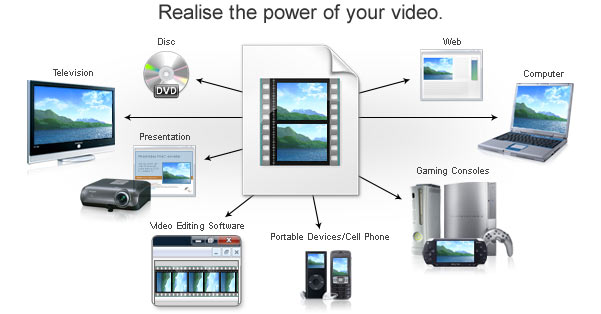
Use this video converter software to convert video files into the formats you need to watch on TV, load to a cell phone, put on a website, create a presentation, watch on your portable device and much more. In fact, the possibilities are endless using this powerful video file converter.

Prism is one of the most stable and comprehensive video converters available and it is very easy to use. But if you don't believe us, try it for yourself. Just add the files you want to convert to the list, select the format you want to use, and then click the convert button.

We make this software free in the hope you will like it so much you will upgrade to Prism Plus which supports additional encode-to formats for professionals.

Typical Applications
  • Convert avi to 3gp to load on to a cell phone.
  • Easily convert video files to mpeg4 for your iPod™, iPhone™, XBox 360™, PSP™ or PS3™ using preset encoder options.
  • Batch convert from the command line for large folders or regular compression of video files.
  • Compress video files for easier storage and backup of security footage.
  • To open or convert video file formats not supported by other video software you use such as slideshow or video editing software.
Other Features
  • Converts avi, mpg, vob, asf, wmv, mp4, ogm and all video formats that have a DirectShow based codec to AVI and Windows Media Video formats.
  • Load multiple formats and convert to a single output format.
  • If you can play the video file using 'Windows Media Player', you can convert it using Prism.
  • Supports all of the popular multimedia devices.
  • Preview original files and output results before converting.
  • Add video files directly from DVDs.
  • Set compression/encoder rates of output files.
  • Set resolution and frame rate of output files.
  • Set a specific size of output files.
  • Integrates with Express Burn Plus to record your video files to DVD (Windows).
  • Prism can be added to your right click menu for easy access.
  • Can run in the background so you can use other programs while converting.
  • Can be run from the command line for automation with other applications.
  • Combine with PhotoStage Slideshow Creator to create slide shows from your video and images.
  • An intuitive and easy to use interface.

  • System Requirements
    • Works on Windows Vista/2008 2000/XP/2003 and Windows 7
    • Mac OS X 10.4 or later

    [download-icon.png]Download

    OJOsoft Total Video Converter


    OJOsoft Total Video Converter is an all-in-one and fast video and audio conversion tool, extremely easy to use.

    OJOsoft Total Video Converter can convert video files between almost all popular video formats including AVI, MPEG-1,2,4, WMV, MP4, MPG, DivX, 3GP, 3G2, MOV, FLV, VOB, Xvid, MKV, TS, M4V, ASF, MJPEG etc.

    It can be used like iPhone video converter, 3GP video converter, PSP video converter, iPod video converter, and Zune video converter to convert all popular video formats to your mobile phone, Sony PSP, Apple iPod/iPhone, Zune video player and other portable video devices.

    Additionally, OJOsoft Video Converter provides an easy way to convert video/audio files to popular audio formats, such as MP3, WMA, AC3, M4A, OGG, AAC etc.

    Key Features:
    1.Support converting video files from one format to another
    2.Support converting audio files between various audio formats
    3.Support extracting audio tracks from video file
    4.Support batch conversion with a task list
    5.Support the latest popular video formats - MKV, TS, h.264, DVR-MS, VC-1
    6.Windows Vista Supported
    7.Unmatchable converting speed, wonderful output quality
    8.You can select video size, bit rate, NTSC/PAL, frame rate, audio codec, sample rate etc
    9.So easy to modify the name and path of output files
    10.When converting files, you can pause, stop and continue at any moment
    11.With the user- friendly interface, OJOsoft Total Video Converter is suited for both veterans and beginners. You can complete your conversion as easy as 1-2-3
    12.All decoders and encoders are built in. Once you download and install OJOsoft Total Video Converter, all supported formats can be converted without downloading any more codec
    13. Safe to install and viruses-free. We respect your privacy. So there are no spyware and adware in OJOsoft Total Video Converter.

    Download

      ©Template Blogger Elegance by Dicas Blogger.

    Go to top